

Wanderer
Hide names above heads in WoW Forever and play in full immersion
Wanderer is a free addon for World of Warcraft Forever. Names leave the heads of everyone around you, a label appears when you look at someone, conversations turn into quiet scenes, and the small comforts you would install a dozen addons for are gathered in one.
Download Wanderer
Version 0.34.0. The CurseForge app installs and updates it for you. Free, translated into 10 languages, in active development.

Play the trailer 0:41
How do I hide names above heads and play in immersion?
Pick the Full immersion preset and the names above heads go away: players, NPCs, enemies, pets, guilds and titles, each one can be set on its own. Balanced keeps only enemies, Show everything puts them all back, and a reveal key shows every name for a moment.
When nothing happens, your interface steps aside and comes back the instant you need it. On a flight everything fades but the chat, and photo mode hides everything with one key.
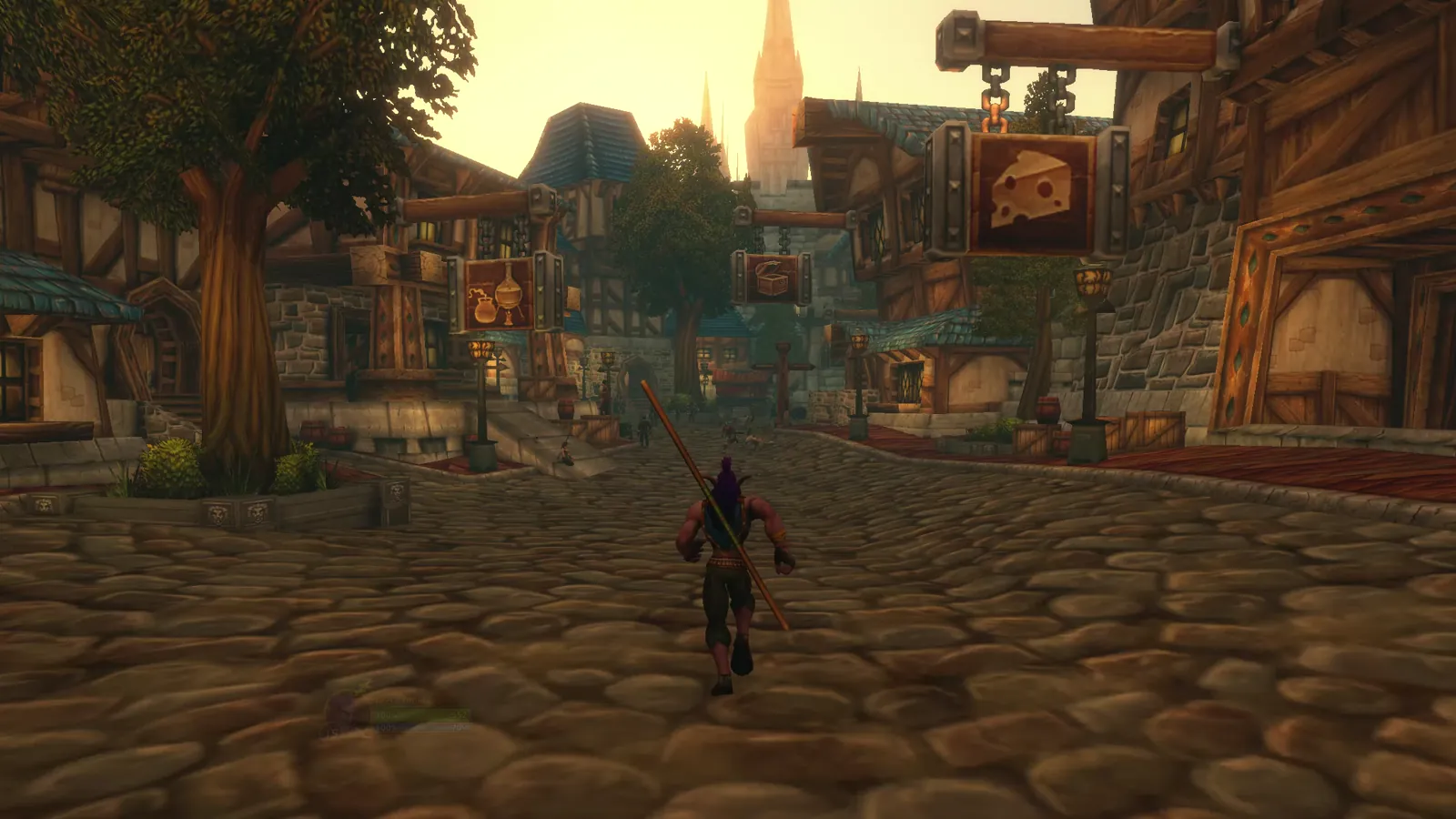
How can I see who someone is without names everywhere?
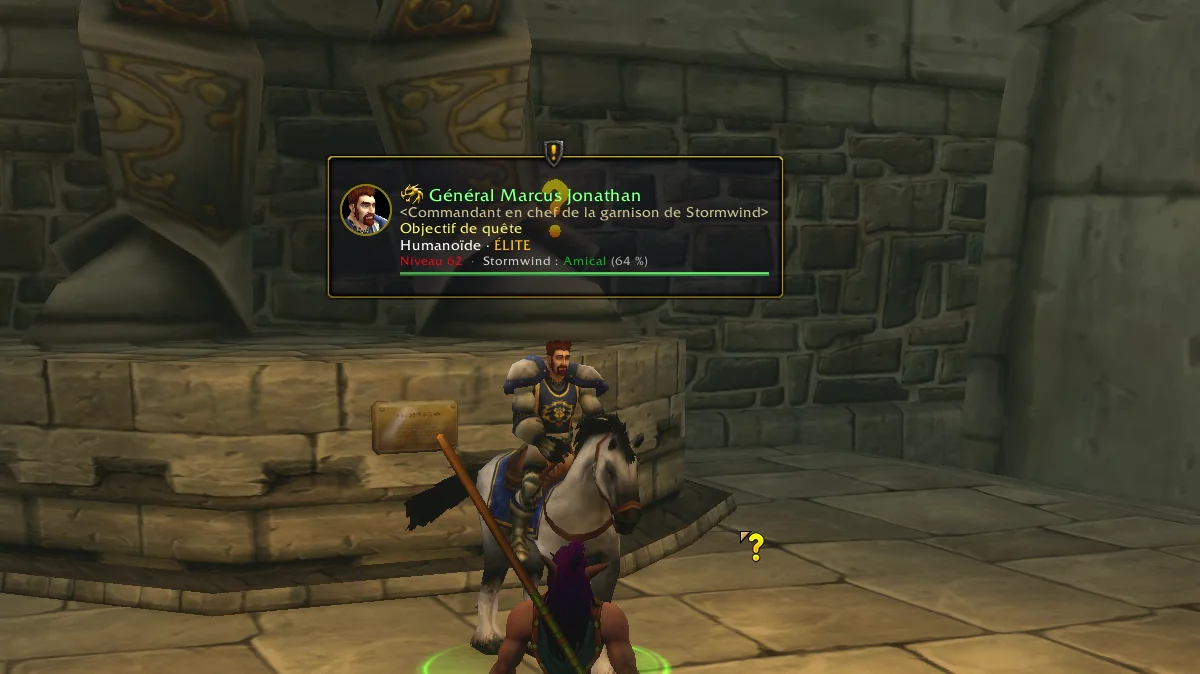
Hover a character and a label appears right above their head, in place of the game's tooltip. You see their portrait, their level colored by difficulty, their role, your reputation with their faction and a small health bar.
It also shows what matters right now: the quest they give or wait for, your objectives (3/8), what you can loot, skin or mine, and who they are looking at.
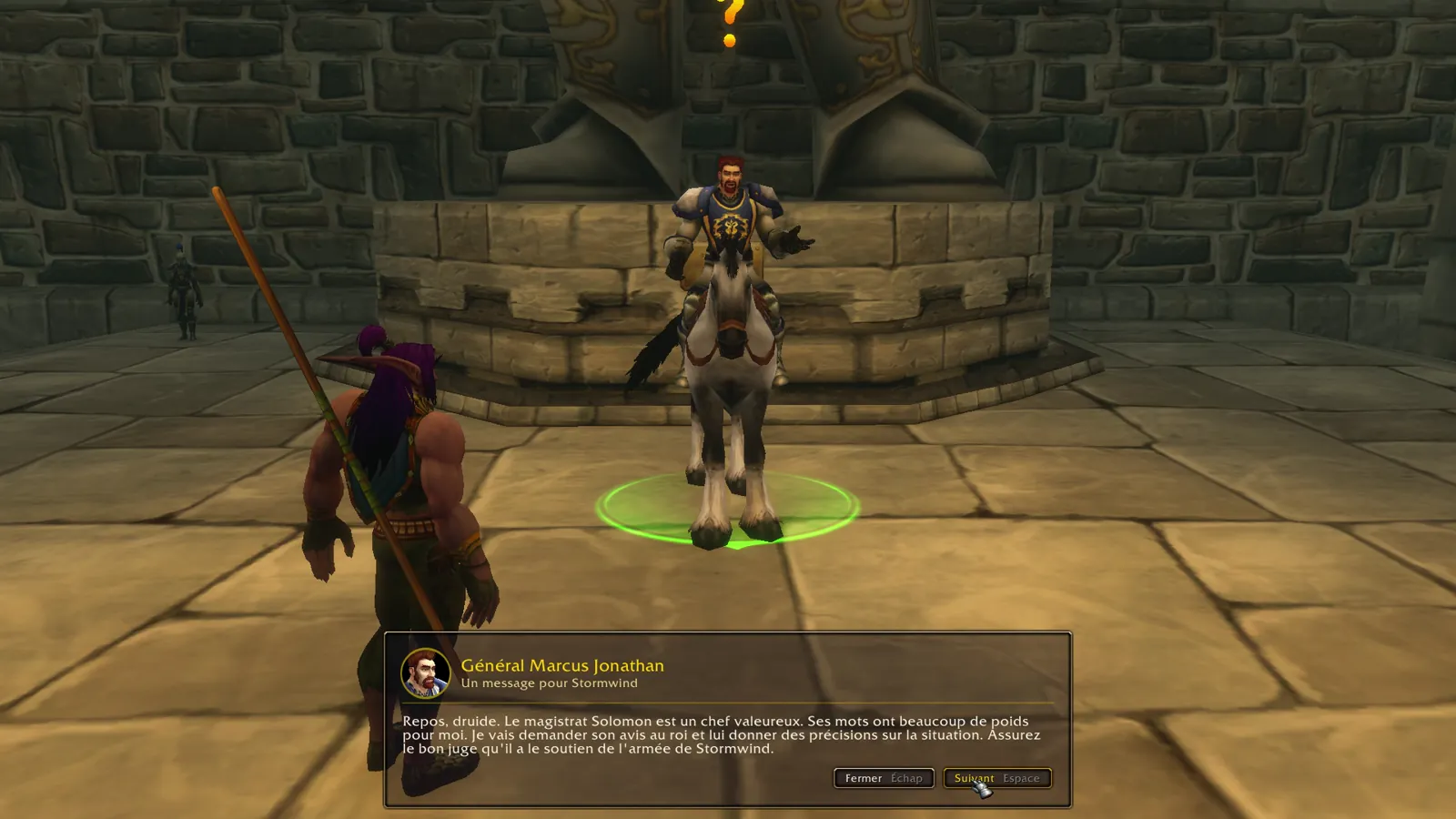
Can quests and dialogues play like quiet cinematic scenes?
Talk to a character and the interface fades away, the camera comes closer, and their words appear page by page in a panel at the bottom of the screen. Rewards show their rarity, items you cannot use are in red and you can compare them with what you wear.
Space continues, 1 to 9 choose, Escape closes. Hold Shift and you get the game's own window, whenever you want it.
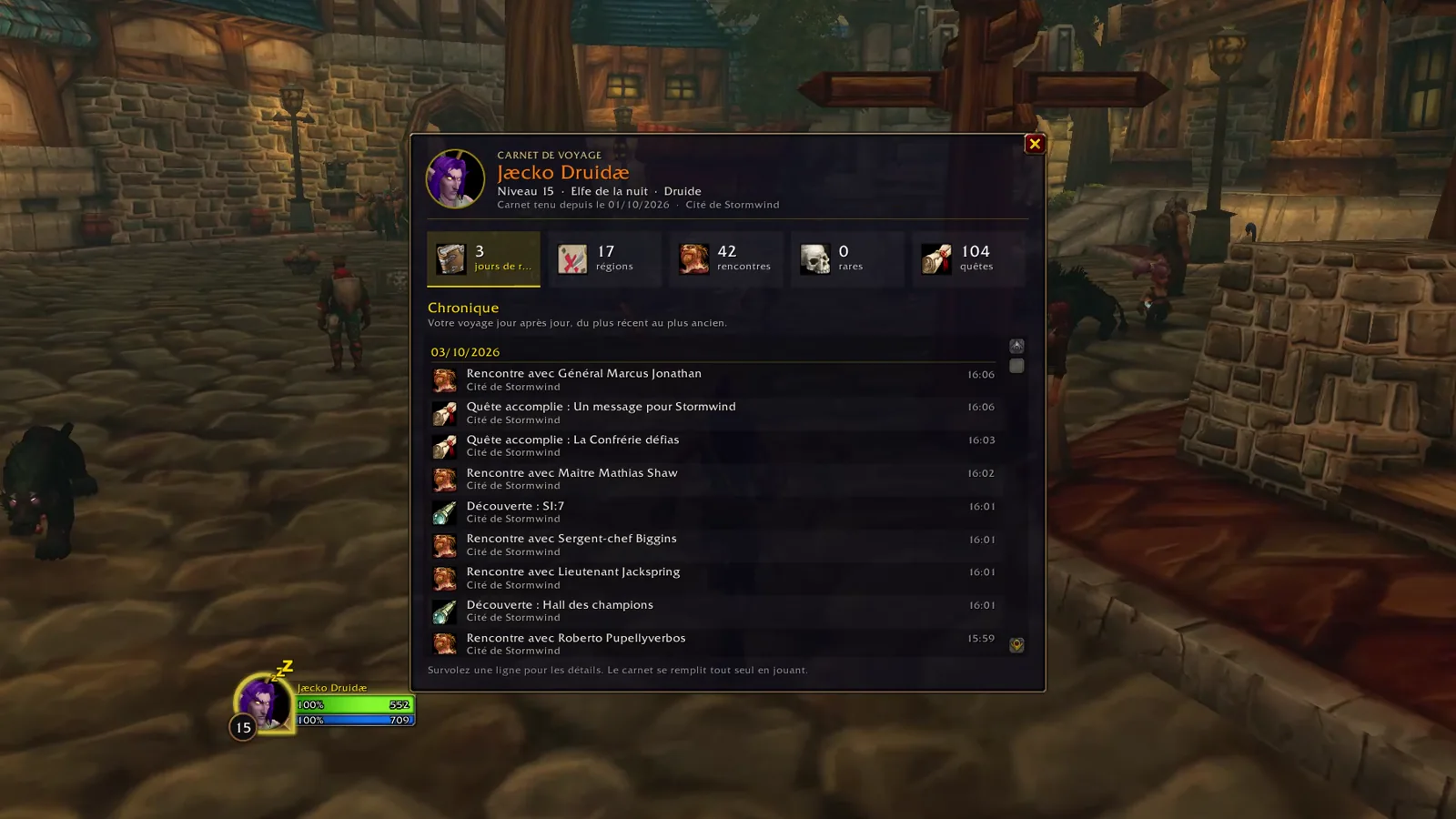
Is there a travel journal that remembers my adventure?
The travel journal writes your journey down day by day: places explored, every quest completed with its title, professions, gold and level, even what you did before installing Wanderer.
Milestones such as your first mount, a dungeon or a night at the inn are written with a short notice and the sound of a quill. A session summary tells you your play time and your gold and experience per hour.

One addon to sell junk, repair, loot instantly and fish with a double click?
Wanderer can sell your junk and repair at merchants (guild bank first if you like), loot instantly when the game's Auto Loot is on, and let you fish with a double right-click. Trainers get a Learn all button, the mailbox a Take all button.
Quests can be accepted and turned in for you, whispers can open in their own window, and game windows can be moved where you want them. Every automation is off until you turn it on, and nothing changes during a fight.
Can I choose the look and keep my own settings?
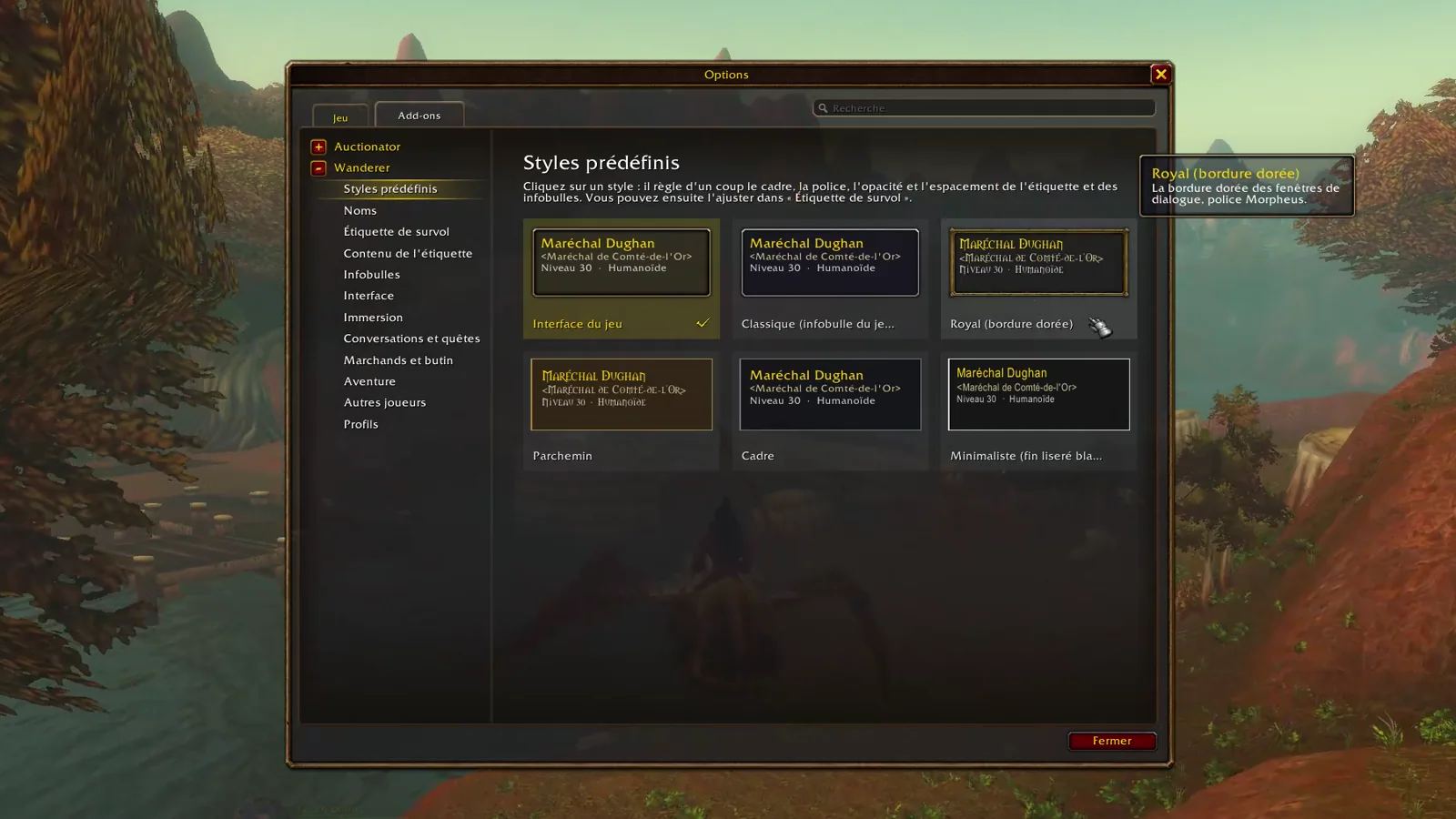
Six predefined styles dress the label, the game's tooltips and the conversation panel alike. Everything sits in the game's own options (Esc, Options, AddOns, Wanderer), with a live preview, and the game's search box finds it.
A welcome screen sets things up the way you play, with profiles per character and per kind of place. Turn Wanderer off and every game setting it changed is given back.
Does Wanderer work with Total RP 3?
Yes. When you hover a roleplayer, the label shows their Total RP 3 name, title and in-character status, right above their head.
Roleplay gestures are there too if you want them: your character reads when opening a book or the mail, cheers on level up and waves at the people they talk to.
Questions
How do I hide names above heads in WoW Forever?
Install Wanderer and choose the Full immersion preset, on the welcome screen or in the Names page of the options. Every name goes away. Hover someone to see who they are, or hold the reveal key.
Does it replace my quest window?
Only while conversation scenes are on. Hold Shift when you talk to an NPC to get the game's window, or turn scenes off in the options.
Will it change my game settings forever?
No. Turn Wanderer off, or type /wanderer off, and every setting it changed is given back.
Does it automate quests by default?
No. Every automation that acts for you is off until you turn it on, and holding Shift always keeps things manual.
Is Wanderer free?
Yes, completely. It is in active development, and nothing leaves your game: no communication with other players or websites.
Installing without an addon app
- Download the zip file from CurseForge.
- Open the WoW Forever folder, then Interface and AddOns (on most installs: World of Warcraft, _classic_beta_, Interface, AddOns).
- Extract the zip there, so that you get a Wanderer folder inside AddOns.
- Start the game, or type /reload if it is running. Type /wanderer to open the options.
Tell me what you think
Wanderer is made by one player and grows with your feedback. A bug, an idea, a translation to fix: every message is read.